

iOS 27 Features: Everything New in Apple's Biggest iPhone Update Since Siri Launched
Apple's iOS 27 update brings Siri AI, custom alarm volumes, and more. Here's every new iPhone feature explained, plus who actually gets it first.

Two years ago, Apple stood on stage and promised a Siri that actually understood you. Then it didn't ship. iOS 27 is the do-over.
Apple unveiled it at WWDC in June 2026, and calling it a routine yearly update undersells what's going on here. This is the release Apple built its whole roadmap around, the one that has to answer an increasingly awkward question: can the company that basically invented the phone assistant catch up to chatbots that made Siri look like a novelty from 2011? Having gone through what Apple showed on stage, plus what's leaked out of the developer betas since, my honest take is: mostly yes, with a few asterisks that are worth knowing about before you get your hopes up.
So if you're trying to figure out whether this update is worth your attention, here's the actual breakdown — not the marketing version.
When does it actually arrive?
Apple's rhythm hasn't changed: preview at WWDC in June, developer beta same day, public beta a month later, full release in September alongside new iPhone hardware. Nothing about iOS 27 breaks that pattern. Barring a surprise, you're looking at September 2026 for the finished product.
Here's a detail that got buried under all the Siri news: this was Tim Cook's last keynote as CEO. He's stepping down at the end of August and handing the job to John Ternus, who's run hardware engineering for years. Knowing that changes how I read the rest of this release — it explains why Apple threw so much at one keynote instead of spreading it out.
Does your iPhone even qualify?
Good news first. iOS 27 is expected to run on anything currently running iOS 26 — supposedly all the way back to the iPhone 11. Nobody's getting cut off this year, which honestly isn't something you can always count on with Apple.
But — and it's a real but — "runs iOS 27" and "gets the full experience" are two different sentences. The most capable version of Siri, the one with custom AI voices and the deepest on-device processing, only works on phones with the newest silicon: iPhone Air, iPhone 17 Pro, and iPhone 17 Pro Max. Everything older still gets the new interface and most of Apple Intelligence. It just won't feel as sharp.
Siri AI is the whole story here
Apple knows this is the headline, and it's not being subtle about it. The assistant literally has "AI" tacked onto its name now, and for the first time it's escaping the little assistant box it's lived in for a decade — it's a full standalone app on iPhone, iPad, and Mac, with your conversation history following you across all three.
What actually matters isn't that it chats better. It's that Siri AI can supposedly read whatever's on your screen and act on it. Someone texts you flight details, you hold the side button, say "add this to my calendar and text mom the arrival time" — and it just does it, no copying, no app-switching. It can also dig through your Mail, Messages, and Photos on its own to answer things you'd normally have to hunt down by hand.
Now here's the part that's been generating actual arguments online: how Apple got here. Instead of building its own frontier model from scratch, Apple struck a multi-year deal — reportedly around $1 billion a year — to run its next-generation Apple Foundation Models on Google's Gemini technology. For a company that has built ten years of marketing around not needing anyone else's cloud, that's a strange pill to swallow. Apple insists the arrangement stays privacy-first, with anything sensitive handled on-device rather than shipped off to Google's servers. Whether that framing holds up under scrutiny is a fair thing to be skeptical about.
One detail most write-ups skip past: down the line, you may actually get to pick which model powers your assistant. Reports point to Gemini, Claude, and ChatGPT all potentially being options, each with its own distinct voice so you always know which one you're talking to.
And before you get too excited: if you're in the EU, none of this arrives on iPhone or iPad at launch. Apple's blaming the Digital Markets Act, which forces it to give rival AI assistants the same system-level access it gives its own — something Apple apparently isn't ready to do yet. Oddly, Mac, Apple Watch, and Vision Pro in the EU aren't affected. If you split time between an iPhone and a Mac in Europe, that inconsistency is worth knowing about now, not after you've upgraded.
Liquid Glass finally gets a dial
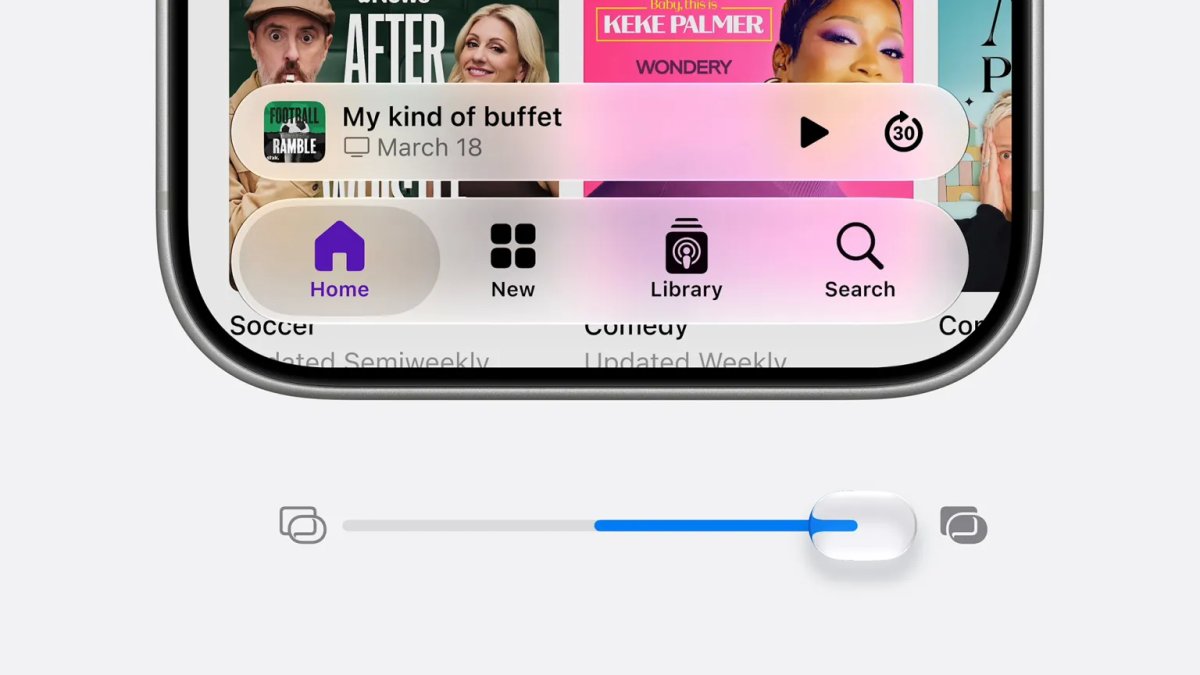
Last year's Liquid Glass redesign split people right down the middle — some loved it, plenty found it borderline unreadable in bright sunlight. Apple heard it. iOS 27 adds a transparency-and-contrast slider under Settings > Appearance, so you can push the glassy effect back toward something more solid, or crank it up if you were actually into it. Small feature, huge relief for a lot of people. Of everything I looked at, this is probably the single most-requested fix from the last year of complaints, and it's sitting right there in Settings instead of buried three menus deep.
Parental controls actually got serious attention
Apple spent real keynote time on this one, and the feature list backs it up:
- A Setup Assistant for parents that pops up automatically the first time you configure a kid's iPhone
- "Ask to Browse," which pings you when your child tries visiting a site they haven't been to
- Time Allowance, for setting time budgets on specific app categories like Entertainment
- Schedule-based screen time, so weekday and weekend rules can actually be different
- Default "Ask to Buy" and mandatory child accounts under 13, closing a gap that used to let younger kids slip through with looser defaults
If Apple's Screen Time tools have ever felt like a blunt instrument to you, this is the biggest overhaul they've had in a long time.
The small stuff that's been annoying people for years
Not everything here is about AI. Some of the best changes are the tiny, overdue ones.
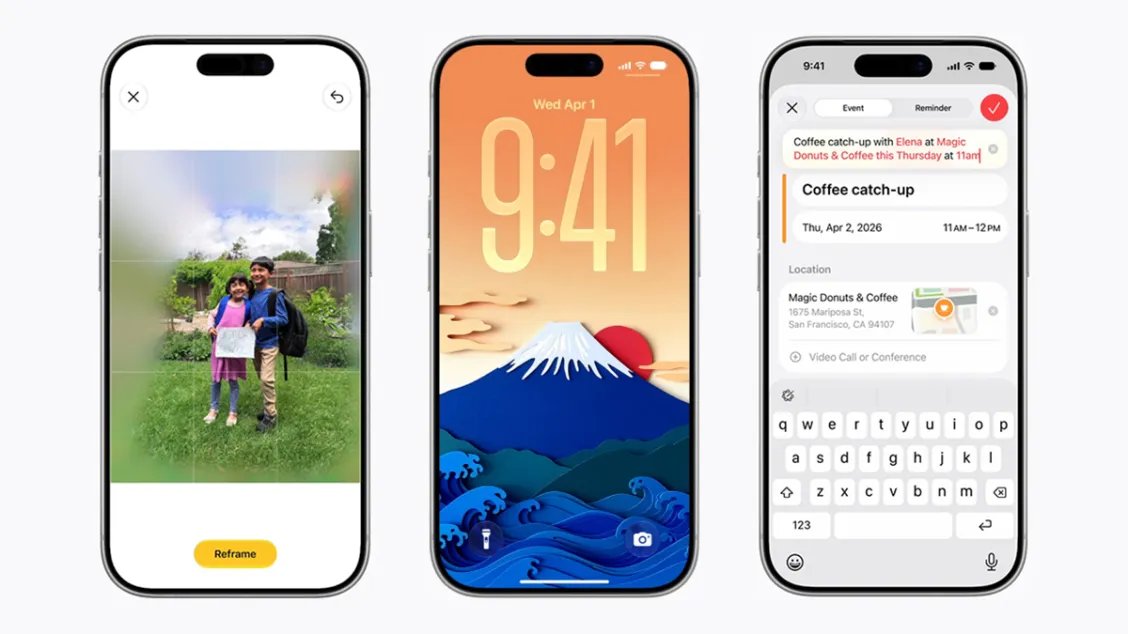
Alarm volume finally has its own slider. Your alarm used to share a volume with ringtones and alerts, which meant a quiet-ringtone setting could also mean sleeping through your alarm. There's now a Match Ringtone Volume toggle under Settings > Sounds & Haptics that lets you decouple the two.
AirPods get a real equalizer. Owners of AirPods Pro 2, AirPods Pro 3, or AirPods 4 can now tweak bass, midrange, and treble by hand — go to Bluetooth settings, tap the "i" next to your AirPods, then Audio and Routing > Equalizer > Custom. Competing headphones have had this forever; it's nice to see Apple catch up.
Drawing tools landed in Messages. Hit the + button in any thread and there's a new Drawing option for quick sketches — handy for marking up a screenshot or just being goofy with a friend.
And speed, unglamorous as it sounds. Apple's claiming up to 30% faster app launches and 70% quicker performance on certain photo tasks. If your phone has felt sluggish since the iOS 26 redesign, this might end up mattering more than any AI feature on this list.
AI image tools got a real upgrade
Image Playground finally moves past its cartoon-only phase and can generate photorealistic images now. The bigger deal is the editing side: you can request changes with plain-language follow-ups, or literally mark on the image where you want something altered, instead of regenerating the whole thing and hoping for the best.
There's also a new Photos feature called Spatial Reframing — it keeps your subject locked in place while letting you shift the angle, perspective, or background around them. Tap Reframe in the editor, pan and rotate as needed, and AI fills in whatever new space that opens up. It won't fix bad photography, but for that one family photo where the framing just missed, it's a genuinely handy save.
Apple Maps picks up AI-enhanced flyovers too, with visible detail down to individual trees in select cities, plus reported satellite-view support.
So, should you update?
If Siri is what you care about, the real upgrade lives on an iPhone Air or 17 Pro — that's where the on-device processing does its heaviest lifting. Older supported phones still get the new interface and most Apple Intelligence features, just with less horsepower behind them.
If you're a parent, this might be worth updating for on its own. It's the most substantial parental-controls release Apple has put out in years.
If you mostly just want your phone to feel faster and less cluttered visually, the performance gains plus that new Liquid Glass slider could be reason enough — even if you never open the new Siri app.
And if you're in the EU: temper your expectations. The headline Siri AI experience isn't showing up on iPhone or iPad at launch, thanks to the ongoing back-and-forth over the Digital Markets Act. Worth knowing before you plan a fall upgrade around a feature you might not actually get on day one.
Frequently Asked Questions
What's Your Reaction?
 Like
0
Like
0
 Dislike
0
Dislike
0
 Love
0
Love
0
 Funny
0
Funny
0
 Wow
0
Wow
0
 Sad
0
Sad
0
 Angry
0
Angry
0














Comments (0)